PostgreSQL and typeorm - Getting a local Postgres instance

Lesson goal
- Set up a local instance of postgres for learning
- Learn where to get a production database
Database course index
This is part of a full course on persistence in postgres with typeorm and sql!
There is a github repo to go with this course. See part 2 for instructions.
You can see examples of typeorm in a real app on Use Miller on GitHub
Why use Postgres?
Postgres is a relational database but it's designed and actually used in production for a range of workloads. The POSTGRES project started at UC Berkeley in 1986 and the first version with SQL (PostgreSQL) was released in the late 90s. It's been thoroughly battle-tested over the years.
Postgres is as advanced as any of the paid databases and receives regular updates and support. It has a huge amount of functionality built-in, supports many datatypes including rich support for JSON documents, indexing, replication, security, procedures, full text search, pub-sub etc etc. Everything you would expect from a modern RDBMS.
Postgres is extensible and has incredible open source and commercial extensions for specific scenarios like time series and geo-spatial data.
Postgres is free and you can run it on most modern OSs! Both AWS and Azure provide fully managed instances of postgres.
RDBMS system structure
Postgres and most RDBMS have a hierarchical structure. The data is stored in a collection of tables. Tables are part of schemas and databases contain schemas.

Let's configure a local instance of postgres for this course.
Glossary: Database schemas
In RDBMS there is a high level concept called a schema that contains tables. Schemas are used as an administrative grouping of tables. Usually only select users can view or modify the tables in a schema so the schema acts a security grouping.
A schema also contains indexes, functions, stored procedures and things like that. One way that developers can think about schemas is that they are a namespacing feature.
Usually each app will use a named schema for app data. To use a schema you create it in the RDBMS and then set TypeORM's schema option, or configure PostgreSQL's search_path.
There is a default schema in postgres called "public". Users still need permissions on the tables inside it: using the public schema does not make all its data viewable or writable by everyone. PostgreSQL 15 also stopped granting every user CREATE permission on the public schema for new databases. Older or upgraded databases can have different permissions, so check them instead of assuming.
1. Installing docker
https://www.docker.com/products/docker-desktop/
Download docker and follow the instructions.
The sample app runs on your host and connects to the published database port, so use localhost. host.docker.internal is useful in the other direction, when code inside a container needs to reach your host.
When docker is finished installing move on to cloning the repository.
2. Cloning the sample repository
Version note: the exercises in this repository use TypeORM 0.3.6 and PostgreSQL 14.3. The concepts still apply, but TypeORM 1.0 now requires Node 20+ and removes some older syntax. I call out the important differences in the lessons.
Open your preferred terminal. For default terminal use: ⌘-space and terminal , enter key.
Navigate to your github projects folder and
# http clone
git clone https://github.com/darraghoriordan/learn_databases

# ssh clone
git clone git@github.com:darraghoriordan/learn_databases.git
Next install the dependencies for the project
# NOTE: the project requires node 18 or above (use node 20+ for current TypeORM)

# cd into the new directory
cd learn_databases

# if you don't have yarn, enable it with corepack (built into node 16.10+)
corepack enable

# install all the packages with yarn
yarn
If that builds you're ready to test the database.
3. Testing the database!
Bring the database to life with
yarn up
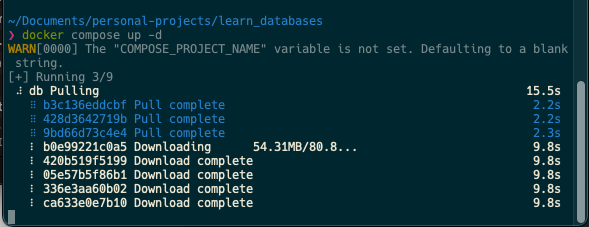
Test the database connection from the sample code with the following test.
If this fails just give the database a minute to start up. It's slow the first time. You can check if postgres is ready by running docker compose logs db or looking for a "ready to accept connections" message.
yarn test:named "connection"
4. Installing Postico
We use Postico to connect to databases to run random SQL so install that now
install with brew
brew install --cask postico
or from the website at https://eggerapps.at/postico/
Open postico and add a new favourite.
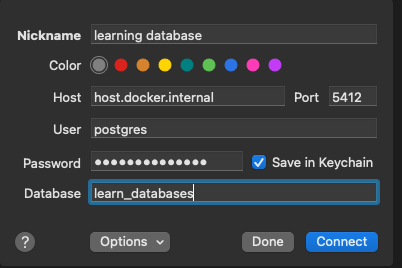
Your settings should be identical. The connection parameters are: host localhost, port 5412, user postgres. Use the password from the .env file.
If it connects you're all set!
Resetting the database
No worries, you can destroy your local instance and rebuild it
To begin you call the destroy script
yarn destroy
This will stop your database and remove the database data
then start the database infrastructure again (see step 3)
yarn up
This will give you a completely fresh database - you'll have to run the schema creation again.
But understand that it's safe to explore and try things. You might break the database but it's no big deal, you can always reset it.
How can I get an instance of postgres online?
We're using a local instance for these demos but for your production applications you won't use a local docker database. You will probably use a database that a cloud provider manages for you online.
You can get instances of postgres from AWS, Digital Ocean, GCP, or Azure. Newer options like Railway, Render, and Neon also offer great managed Postgres.
You can easily run postgres for a hobby site on a $5 Digital Ocean droplet with dokku.
You don't have to do anything now, but just be aware of this.
Supabase is an interesting cloud implementation of Postgres. It exposes many of Postgres' features over REST or GraphQL apis and adds cloud functionality to make it more like Firebase.
For example it makes use of the built in Postgres Row Level Security (RLS). This is typically not used in most typeorm applications but Supabase exposes the APIs in a very developer friendly way.
It's worth checking out for your first Postgres database. Find Supabase here
Adding Database Schema
The database you just created will be "empty". There are no tables yet but we will add tables and other schema items in later lessons.
In part 3 of this series - Storing data in postgres we will manually add some tables to the database using CREATE commands.
Most applications these days will use migrations to populate schema in a database and we cover that in Part 4 - Getting into relations. Jump ahead and read about migrations if you like but don't skip lesson 3 entirely.
Summary
You should have a local instance of postgres database running on your machine.
We will start using it in the next lessons!