Darragh ORiordan

  • About
  • Articles
  • Projects
  • Hire

Stay up to date

Subscribe to the newsletter to stay up to date with articles, news and much more!

Read the Privacy Policy.

Socials & Contact

  • Follow on Twitter
  • Follow on GitHub
  • Follow on LinkedIn
  • mailto:[email protected]

Sitemap

AboutArticlesProjectsHire

© 2026 Darragh ORiordan. All rights reserved.

Fixing Docker and docker-compose named pipes error (code2)

  • #devops
Photo by Sergi Kabrera on UnsplashJanuary 24, 2019

Docker on Windows 10 sometimes breaks after an upgrade. When you try to list containers or use docker-compose you'll get an error on the command line. Here is an easy way to fix this issue.

The error looks like

> docker-compose up
Windows named pipe error: The system cannot find the file specified. (code: 2)

The first step is to right click on Docker for Windows in the status area
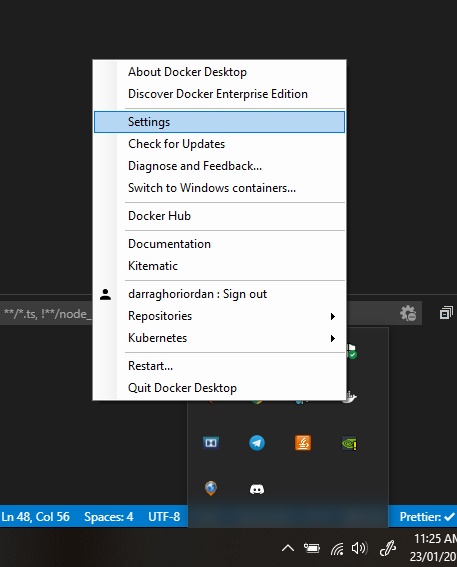
Docker settings

Click on "Settings"

Open the Reset Tab
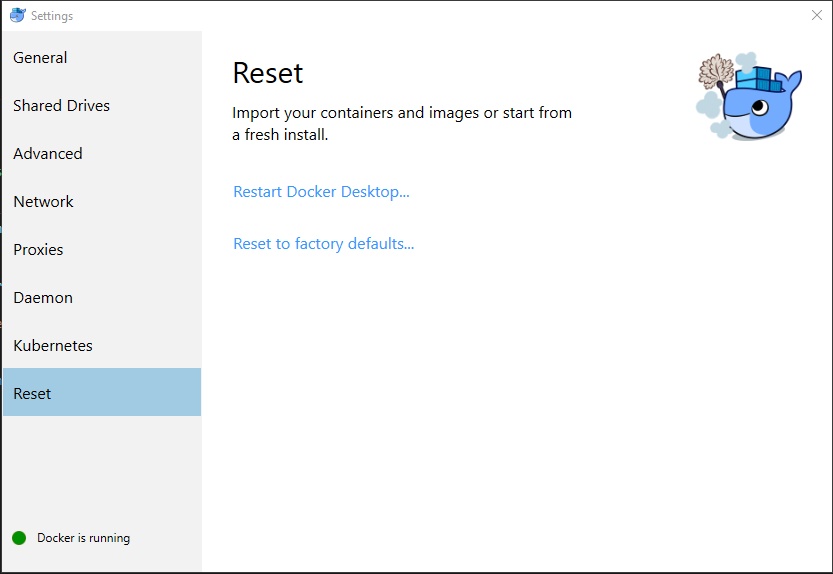
Docker settings reset tab

Click "Reset to Factory Defaults..."

Docker will ask for your username and password and docker-compose up should work now!

Hey! Are you a developer?

🚀 Set Up Your Dev Environment in Minutes, Not Hours!

Tired of spending hours setting up a new development machine? I used to be, too—until I automated the entire process!

Now, I just run a single script, grab a coffee, and let my setup take care of itself.

Save 30+ hours configuring a new Mac or Windows (WSL) development environment.
Ensure consistency across all your machines.
Eliminate tedious setup and get coding faster!
Get Instant Access →